 abap news
Paste Excel Data into a UI5 Table
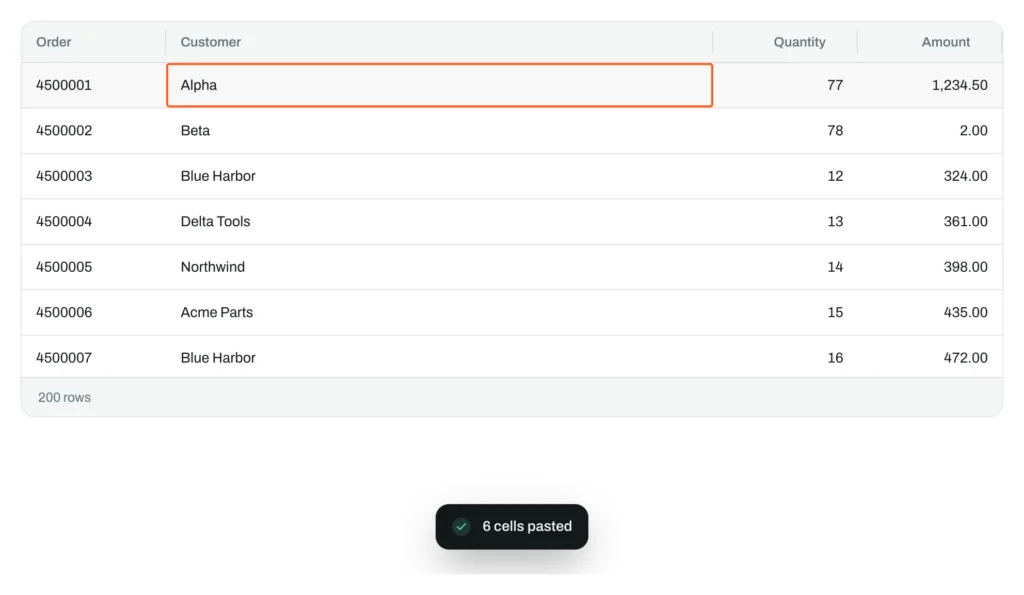
Both sap.ui.table.Table and sap.m.Table fire a paste event since UI5 1.60. The event gives you the clipboard as a two-dimensional array, but it does not write anything to your model. You decide where the rows go, check the values and update the model.
Handle the paste event
<t:Table rows="{/orders}" visibleRowCount="8" paste=".onPaste">
  <t:columns>
    <t:Column><Label text="Order"/><t:template><Text text="{id}"/></t:template></t:Column>
    <t:Column><Label text="Customer"/><t:template><Input value="{customer}"/></t:template></t:Column>
    <t:Column><Label text="Quantity"/><t:template><Input value="{quantity}"/></t:template></t:Column>
  </t:columns>
</t:Table>
onPaste: function (event) {
  const pasted = event.getParameter("data"); // array of rows, each an array of strings
  const model = this.getView().getModel();
  const orders = model.getProperty("/orders").slice();
  pasted.forEach((cells, i) => {
    const quantity = Number(cells[1]);
    if (!orders[i] || cells.length < 2 || !Number.isFinite(quantity)) { return; }
    orders[i] = { ...orders[i], customer: cells[0], quantity };
  });
  model.setProperty("/orders", orders);
}
Paste these two lines (separate the columns with a tab, as Excel does):
Alpha   77
Beta    78
Result: the first order gets customer Alpha and quantity 77, the second Beta and 78. Click a cell that is not an input field before you paste. If the cursor is inside an input field, the browser pastes into that field.
What the event does not tell you
paste has no target cell. The handler above always starts at the first row and expects the columns in a fixed order. Starting at the selected cell means tracking the focused cell yourself and mapping column indexes to model paths.
Values also arrive as strings. Number("1.234,50") is NaN, so the example skips such a row. Parse with sap.ui.core.format.NumberFormat when users copy locale-formatted numbers.
Paste by cell with a grid control
Kor is our open-source UI5 library. Its DataGrid starts at the selected cell, maps the columns by position and skips columns that are not editable:
<DataGrid rows="{/orders}" height="24rem" label="Order items" cellChange=".onCellChange">
  <columns>
    <Column label="Order" path="id" pinned="true"/>
    <Column label="Customer" path="customer" grow="1" editable="true"/>
    <Column label="Quantity" path="quantity" type="number" editable="true"/>
    <Column label="Amount" path="amount" type="number" decimals="2" editable="true"/>
  </columns>
</DataGrid>
Click a customer, then paste several cells from a spreadsheet. cellChange reports each change after it was written to the model.
Which one to use
| Requirement | paste event |
Kor DataGrid |
|---|---|---|
| Fixed import layout | Good fit | Works |
| Paste at the selected cell | Write it yourself | Built in |
| Create new rows from the clipboard | Write it yourself | Not supported |
| Fiori look | Yes | No |
For thousands of rows, upload a file and let the backend validate it: CSV to ABAP internal table. Client-side checks do not replace validation in the service.
We ran both examples in Chrome with OpenUI5 1.108.55 and 1.154.0.
Sources: sap.ui.table.Table API · sap.m.Table API